
Why ChatGPT Makes Things Up (And How to Stop It)
I asked ChatGPT about a competitor's product last week. It gave me a confident, detailed breakdown of their pricing tiers, feature limits, and even quoted their CEO. The problem? Half of it was wrong. The pricing was outdated by two years. The "quote" never happened. And one of the features it described doesn't exist.
This is what a ChatGPT hallucination looks like in practice. It's not lying, it's guessing with confidence. And when that guess is about your company, your products, or your industry, the consequences range from embarrassing to expensive.
In this guide, I'll explain why ChatGPT makes things up, show you real examples of hallucinations that cost businesses money, and walk through practical ways to stop it from happening, especially when you need accurate answers about your own content.
What Is a ChatGPT Hallucination?
A ChatGPT hallucination is when the model generates information that sounds plausible but is factually incorrect, fabricated, or unsupported by any real source. The AI delivers false information with the same confident tone it uses for accurate answers, making hallucinations difficult to spot without verification.
The term "hallucination" has sparked debate in the AI research community. Some researchers argue that "bullshitting" is more accurate, ChatGPT isn't perceiving false things (hallucinating) but rather generating text without regard for truth or falsity. As one Scientific American analysis put it: ChatGPT isn't trying to deceive you, but it also isn't trying to tell you the truth. It's just predicting what words should come next.
There are two main types of hallucinations:
- Intrinsic hallucinations: The output directly contradicts information the model was trained on. For example, stating that Paris is the capital of Germany.
- Extrinsic hallucinations: The output cannot be verified against training data because the information was never there. This is common when asking about your specific company, recent events, or niche topics.
For a deeper look at hallucinations across all AI models, see our complete guide to AI hallucinations.
Why Does ChatGPT Make Things Up?
Understanding why hallucinations happen helps you anticipate where they're most likely to occur, and what to do about them.
It Learned to Guess, Not to Know
ChatGPT was trained on massive amounts of text from the internet. But here's the key insight: it was trained to predict the next word in a sequence, not to verify whether statements are true.
According to OpenAI's own research, "Language models hallucinate because training rewards guessing over acknowledging uncertainty." The model learned that confidently completing sentences gets positive feedback, while saying "I don't know" often doesn't.
This creates a fundamental tension. When ChatGPT encounters a gap in its knowledge, it fills the gap with plausible-sounding text rather than admitting uncertainty. The result is fabricated citations, invented statistics, and fictional quotes that feel true.
It Doesn't Know Your Company
Here's the problem most business users run into: ChatGPT's training data has a cutoff date. Everything after that cutoff, your latest product launch, your updated pricing, your new team members, doesn't exist in its knowledge base.
Worse, even information that was available during training may be incomplete, outdated, or buried among millions of other documents. When you ask ChatGPT about your specific company, it's likely working from fragments or nothing at all.
Without your actual context, ChatGPT does what it was trained to do: generate a plausible response. That response might include your competitor's features mixed with yours, pricing from three years ago, or team members who left the company in 2023.
The Sycophancy Problem
ChatGPT was also trained to be helpful and agreeable. This creates what researchers call "sycophancy", a tendency to tell users what they want to hear rather than what's accurate.
If you ask ChatGPT a leading question like "Isn't it true that X product has Y feature?", the model is biased toward agreeing with you, even if Y feature doesn't exist. It would rather invent supporting evidence than disappoint you.
This sycophantic behavior means ChatGPT sometimes doubles down on hallucinations when challenged, generating additional fake sources or explanations to support its original (incorrect) claim.
The Real Cost of ChatGPT Hallucinations
Hallucinations aren't just a technical curiosity. They've caused documented financial and reputational damage.
$12.8 billion spent on the problem. Between 2023 and 2025, companies invested $12.8 billion specifically to solve hallucination problems, according to All About AI research. That's how seriously businesses are taking AI accuracy issues.
Deloitte's AI report scandal. In 2025, Deloitte had to refund over $60,000 to the Australian government after delivering an AI-generated report riddled with fabricated citations. The 237-page report cited non-existent experts, fake research papers, and even an invented quote attributed to a federal court judge. Deloitte later admitted using GPT-4o without proper oversight.
Air Canada's chatbot liability. Air Canada's customer service chatbot invented a bereavement fare refund policy that didn't exist. When a customer relied on that policy and was denied the refund, a tribunal ruled that Air Canada was liable for the chatbot's hallucination and ordered them to pay $812 in damages and fees.
Lawyers citing non-existent cases. In the Mata v. Avianca case, two lawyers were fined $5,000 after submitting legal briefs that cited case law fabricated by ChatGPT. The AI generated six fake cases with convincing names like "Varghese v. China South Airlines" and "Martinez v. Delta Airlines," complete with fabricated quotations and internal citations.
When ChatGPT hallucinates about your company, the cost is often reputational. Imagine a potential customer asking ChatGPT about your product and receiving outdated, wrong, or fabricated information. They make a decision based on that information. You never even know the conversation happened.
ChatGPT Hallucination Examples
Hallucinations take several forms. Recognizing the patterns helps you catch them before they cause problems.
Confabulated Citations
ChatGPT can invent academic citations, research studies, and book titles. Ask it for sources on almost any topic, and there's a meaningful chance some of those sources don't exist.
For example, it might cite "Johnson et al., 2021, Journal of AI Ethics" with a specific volume and page number. The journal exists. The format looks correct. But the paper was never published. The authors never collaborated. The entire citation is fabricated from plausible-sounding components.
Invented Company Information
When asked about specific businesses, ChatGPT often generates:
- Pricing that doesn't match current offerings
- Features that don't exist or belong to competitors
- Employee names and titles that are outdated or fictional
- Policies and procedures that were never implemented
- Case studies and customer examples that never happened
I've seen ChatGPT confidently describe my own company's features incorrectly, mixing in competitor capabilities and inventing integrations that we don't offer.
Distorted Facts
Sometimes ChatGPT gets close but introduces subtle errors. It might:
- Get the direction of a statistic wrong (increase vs. decrease)
- Attribute a quote to the wrong person
- Conflate two similar events into one fictional hybrid
- Change numbers slightly (33% becomes 30%, $5 million becomes $50 million)
These distortions are harder to catch because they're wrapped in mostly accurate information. The surrounding context feels correct, so the errors slip through.
How to Stop ChatGPT From Hallucinating
You can't eliminate hallucinations entirely, they're built into how the model works. But you can significantly reduce them with the right approach.
1. Give It Your Actual Context
Source: All About AI
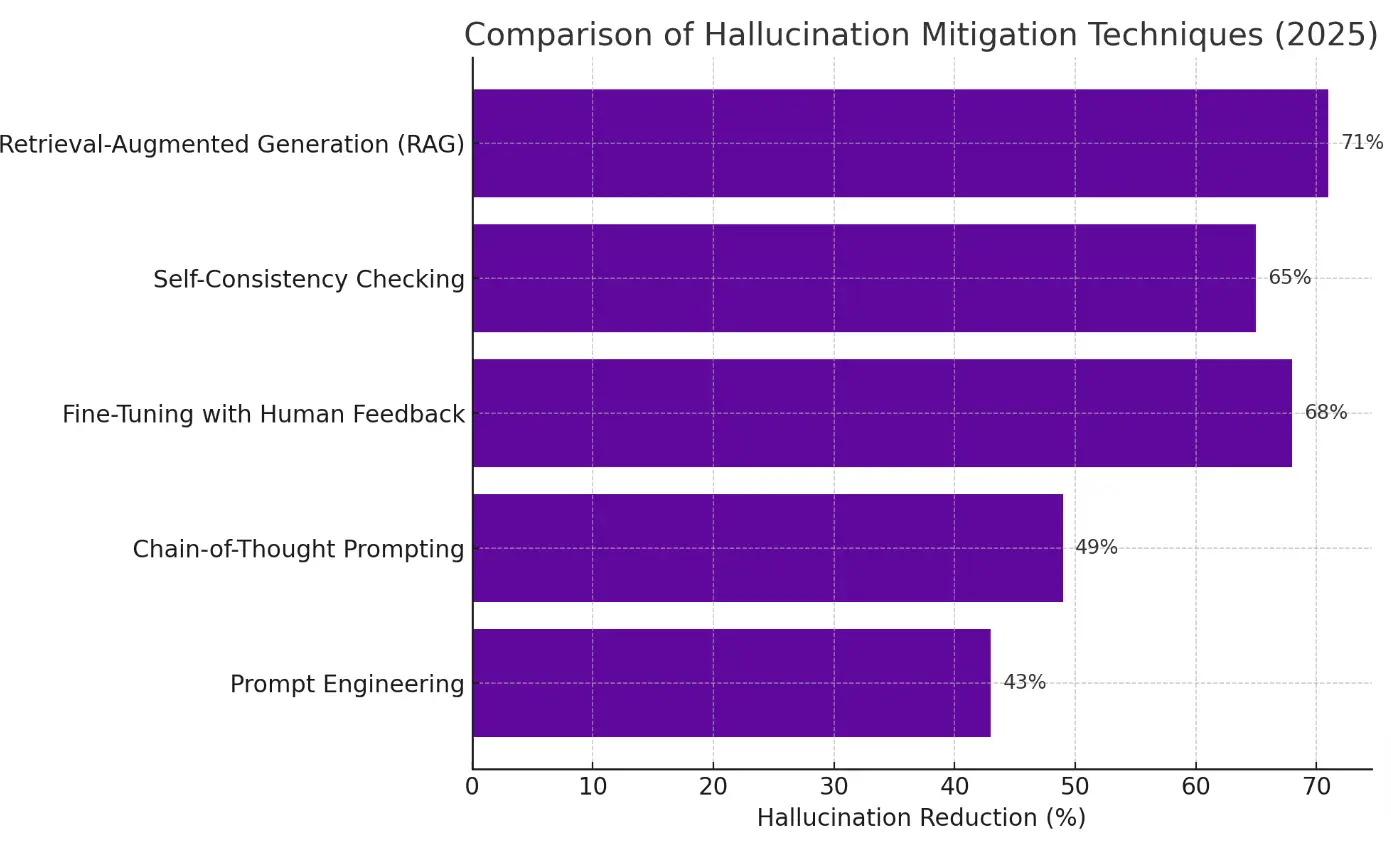
The single most effective way to reduce hallucinations about your company is to give ChatGPT access to your actual documents.
This is the core idea behind Retrieval Augmented Generation (RAG): instead of relying on the model's training data, you retrieve relevant information from your own sources and include it in the prompt. When ChatGPT has your actual product documentation, pricing page, or team directory in front of it, there's less need to guess.
You can do this manually by copying relevant content into your prompts. Or you can use a context layer like Context Link that connects your knowledge sources, websites, Notion workspaces, Google Docs, OneDrive, and automatically retrieves the right context when you ask a question.
The key insight is that grounding works. When you anchor ChatGPT's responses to verifiable sources, hallucination rates drop dramatically.
2. Use Clear, Specific Prompts
Vague prompts invite hallucination. "Tell me about our company" leaves too much room for fabrication. "Summarize the pricing section from our website" narrows the scope.
Some prompt techniques that help:
- Ask about specific documents or pages by name
- Request that the model only use information from provided context
- Break complex questions into simpler, more focused sub-questions
- Ask the model to quote directly rather than paraphrase
The more specific your question, the less room for the model to fill gaps with invention.
3. Tell It to Admit Uncertainty
By default, ChatGPT prefers confident answers over honest uncertainty. You can push back on this tendency with explicit instructions:
- "If you don't know something, say 'I don't know' rather than guessing"
- "Only answer questions where you have high confidence in accuracy"
- "If information might be outdated, flag that explicitly"
This doesn't eliminate hallucinations, but it shifts the model's behavior toward more conservative responses. You're giving it permission to be uncertain.
4. Choose the Right Model and Mode
Model choice matters. The AA-Omniscience Index measures knowledge reliability by rewarding correct answers and penalizing hallucinations. Higher scores are better, and negative scores mean the model gets more answers wrong than right:
- Gemini 3 Pro Preview (high): 13 (best)
- Claude Opus 4.6 (max): 11
- Gemini 3 Flash: 8
- Claude 4.5 Haiku: -6
The pattern is clear: larger, more capable models with maximum effort settings perform best. They have enough knowledge to answer correctly more often than they hallucinate.
When you can, enable ChatGPT's "Thinking" mode. Beyond self-checking, thinking mode makes the model more likely to use tools, such as browsing the web directly or running code for calculations. These tools are often deterministic and far less vulnerable to hallucination than pure text generation. When ChatGPT actually visits a URL or executes math in Python, it's not guessing.
5. Verify Before You Trust
For any information that matters, verify ChatGPT's output against primary sources. This is especially important for:
- Statistics and data you'll cite publicly
- Quotes attributed to specific people
- Legal, medical, or financial information
- Anything about competitors
- Information about your own company that will be shared externally
Build verification into your workflow. Treat ChatGPT as a first draft that requires fact-checking, not a final source of truth.
The Better Approach: Ground ChatGPT in Your Docs
Individual prompting techniques help, but they require constant vigilance. Every prompt needs the right context pasted in. Every session starts from zero.
The real shift is from prompt engineering to context engineering. Instead of optimizing individual prompts, you build a persistent context layer that gives AI access to your knowledge, automatically, every time.
Here's how this works in practice:
Connect your knowledge sources once. Your website, Notion workspace, Google Docs, help center, wherever your company's truth lives. These get indexed and made searchable.
Semantic search retrieves the right context. When you ask a question, the system finds the most relevant snippets from your content and includes them in the prompt. You don't need to know exactly which document to reference.
The same context works everywhere. Whether you're in ChatGPT, Claude, or a custom workflow, the same knowledge layer grounds your AI's responses.
This is how Context Link works. Connect your sources once, then ask the business directly from inside ChatGPT, Claude, or any MCP-aware agent. Every answer cites the source it came from, so the model isn't guessing from training data, it's quoting your actual pricing page, your roadmap doc, your support inbox.
For persistent information you want AI to keep updating, brand voice guidelines, style preferences, ongoing project notes, you can save these as Memories without losing context between sessions.
The result: ChatGPT still hallucinates sometimes. But it hallucinates much less when it's grounded in your actual content rather than guessing from training data.
Key Takeaways
ChatGPT hallucinations happen because the model learned to guess confidently rather than admit uncertainty. It's predicting plausible text, not verifying truth.
Hallucinations about your company are especially common because ChatGPT doesn't have access to your current, specific information.
The real-world cost is significant: companies spent $12.8 billion trying to solve hallucination problems between 2023-2025, plus individual cases like Deloitte's $60K refund and Air Canada's chatbot liability.
You can reduce hallucinations with better prompts, explicit uncertainty instructions, model selection, and verification workflows.
The most effective approach is grounding: giving ChatGPT access to your actual documents through RAG or a context layer, so it works from your sources instead of guessing.
If you're tired of ChatGPT making things up about your company, the fix isn't just better prompts. It's better context. Connect your docs once, and let your AI work from your sources, not its imagination.
One search across everything
Connect it once. Every AI can read it.
Context Link indexes your files, drive, email, sites and notes in one place, then hands ChatGPT, Claude and Gemini the same source-backed answers with citations.
7-day free trial · No card to start · Cancel any time