Claude Skills: SEO Context for Content Creation

Claude Skills: SEO Context for Content Creation

The SEO Context skills help you build a persistent knowledge base for SEO content creation with Claude and OpenAI Codex. Instead of re-explaining your brand voice, target keywords, and content guidelines in every AI conversation, store them once in Context Link and retrieve them whenever you need them.

These skills are designed to work with SEO-focused workflows like the SEO Machine plugin, but work standalone too.

What's included

Four skills covering six context types:

Skill Purpose Context Types
get-seo-context Retrieve or create SEO context Guidelines, Target Keywords, Competitor Analysis
get-seo-writing-context Retrieve or create writing context Brand Voice, Style Guide, Writing Examples
save-seo-context Save/update SEO context Guidelines, Target Keywords, Competitor Analysis
save-seo-writing-context Save/update writing context Brand Voice, Style Guide, Writing Examples

Context namespaces

Each context type is stored under a dedicated namespace:

SEO Context:
- seo_memory_guidelines, SEO rules (keyword density, structure, meta elements, linking strategy)
- seo_memory_target_keywords, Target keywords and topic clusters
- seo_memory_competitor_analysis, Competitive intelligence

Writing Context:
- seo_memory_brand_voice, Brand voice, tone, and messaging framework
- seo_memory_style_guide, Grammar, formatting, and editorial standards
- seo_memory_writing_examples, Exemplary content samples for style reference

When to use these skills

  • You're creating content regularly and want consistent voice, style, and SEO optimization
  • You're using multiple AI tools and want them all to access the same brand guidelines
  • You're onboarding a new team member or AI workflow and need to transfer your content knowledge
  • You're working with the SEO Machine plugin and want cloud-based context storage instead of local files

How the "get" skills work

The get skills (get-seo-context and get-seo-writing-context) follow a smart workflow:

  1. Try to fetch existing context, Claude makes GET requests to each namespace
  2. Use what exists, Any context that returns content is used immediately
  3. Run wizard for missing contexts, If a namespace returns 404, Claude walks you through questions to build that context
  4. Save the new context, Once you've answered the questions, Claude POSTs the compiled context back to Context Link

This means the first time you use these skills, you'll go through a brief setup wizard. After that, the context is retrieved instantly.

The skill files

Below are the full skill definitions. Replace YOUR_CONTEXT_LINK with your personal Context Link URL (e.g. yourname.context-link.ai). If you use a PIN, append ?p=YOUR_PIN to the URL.

If you don't include your Context Link URL, Claude will ask you for it when you use the skill.

get-seo-context

**What is Context Link?** Context Link is an external service that indexes connected sources (websites, Google Drive, Notion) and memories into a searchable knowledge base. It provides semantic search and memory storage via a simple URL: `subdomain.context-link.ai/query?p=optional_pincode`. If you don't know the user's Context Link URL, ask them for it.

---

### Get SEO Context

Retrieve SEO context for content creation. Checks Context Link memory first, then runs a wizard if context doesn't exist.

**Context Namespaces** (3 total):
- `seo_memory_guidelines` - SEO rules (keyword density, structure, meta elements)
- `seo_memory_target_keywords` - Target keywords and topic clusters
- `seo_memory_competitor_analysis` - Competitive intelligence

**Workflow:**

1. **Print this message:** `🔗 Retrieving SEO context from Context Link` — Never print the actual Context Link URL, as it contains a private 'pin' or 'p' URL param.

2. **Fetch existing context.** Try to GET each namespace:

```bash
curl -s "YOUR_CONTEXT_LINK/seo_memory_guidelines"
curl -s "YOUR_CONTEXT_LINK/seo_memory_target_keywords"
curl -s "YOUR_CONTEXT_LINK/seo_memory_competitor_analysis"
```

3. **Check what exists.** If a request returns content (not 404), use it. If any namespace is missing, run the wizard for that context type.

4. **Run wizard for missing contexts.** Ask questions step-by-step to build the context. One context at a time.

---

**WIZARD: SEO Guidelines** (if `seo_memory_guidelines` is missing)

Ask these questions in order, one at a time:

1. "What's your target content length for standard blog posts? (e.g., 1500-3000 words)"
2. "What's the maximum article length before you'd break content into multiple posts?"
3. "What keyword density do you target for your primary keyword? (e.g., 1-2%)"
4. "How many H2 sections should a standard article have?"
5. "What's your meta title character limit? (typically 50-60)"
6. "What's your meta description character limit? (typically 150-160)"
7. "How many internal links should each article contain? (e.g., 3-5)"
8. "How many external links should each article contain? (e.g., 2-3)"
9. "What reading level do you target? (e.g., 8th-10th grade)"
10. "Any specific formatting rules? (e.g., subheadings every 300-400 words, always use lists)"

After collecting answers, compile into markdown and POST:

```bash
curl -s -X POST "YOUR_CONTEXT_LINK/seo_memory_guidelines" \
  -H "Content-Type: text/plain" \
  -d 'Your compiled SEO guidelines markdown here'
```

---

**WIZARD: Target Keywords** (if `seo_memory_target_keywords` is missing)

Ask these questions in order:

1. "What is your business/product? (1-2 sentences)"
2. "What are your 3-5 main topic clusters or pillar keywords?"
3. "For your FIRST pillar keyword, list 5-10 related cluster keywords"
4. "For your SECOND pillar keyword, list 5-10 related cluster keywords"
5. "For your THIRD pillar keyword, list 5-10 related cluster keywords"
6. (Continue for remaining pillars if any)
7. "What are 10-15 long-tail keywords you want to target?"
8. "What are the top 5 'People Also Ask' questions in your space?"
9. "Any seasonal or trending keywords to track?"

Compile into topic cluster format and POST:

```bash
curl -s -X POST "YOUR_CONTEXT_LINK/seo_memory_target_keywords" \
  -H "Content-Type: text/plain" \
  -d 'Your compiled target keywords markdown here'
```

---

**WIZARD: Competitor Analysis** (if `seo_memory_competitor_analysis` is missing)

Ask these questions in order:

1. "Who are your top 3-5 direct competitors? (company names and URLs)"
2. "For COMPETITOR 1: What's their content strategy? (frequency, types, avg length)"
3. "For COMPETITOR 1: What are their top 3 ranking articles/keywords?"
4. "For COMPETITOR 1: What are their SEO strengths and weaknesses?"
5. (Repeat for remaining competitors)
6. "What keywords do competitors rank for that you don't?"
7. "What content gaps exist that you could fill?"
8. "What's your unique advantage over these competitors?"
9. "Are there any content publishers (not product competitors) you compete with for visibility?"

Compile into competitor analysis format and POST:

```bash
curl -s -X POST "YOUR_CONTEXT_LINK/seo_memory_competitor_analysis" \
  -H "Content-Type: text/plain" \
  -d 'Your compiled competitor analysis markdown here'
```

---

**Rules:**
- Always try GET first before running wizards
- Run one wizard at a time, complete it fully before moving to next
- Keep answers concise but comprehensive
- If user says "skip" for any context type, don't create it
- After saving, confirm: "Saved SEO [context type] to Context Link"
- Return all retrieved/created context to the user for reference
- If requests are blocked, ask the user to add `*.context-link.ai` to Claude's **Settings → Capabilities → Domain Allowlist** (or select "All domains"), then retry.

get-seo-writing-context

This skill is also available as a plugin in our Claude marketplace.

**What is Context Link?** Context Link is an external service that indexes connected sources (websites, Google Drive, Notion) and memories into a searchable knowledge base. It provides semantic search and memory storage via a simple URL: `subdomain.context-link.ai/query?p=optional_pincode`. If you don't know the user's Context Link URL, ask them for it.

---

### Get SEO Writing Context

Retrieve writing context for SEO content creation. Checks Context Link memory first, then runs a wizard if context doesn't exist.

**Context Namespaces** (3 total):
- `seo_memory_brand_voice` - Brand voice, tone, and messaging framework
- `seo_memory_style_guide` - Grammar, formatting, and editorial standards
- `seo_memory_writing_examples` - Exemplary content samples for style reference

**Workflow:**

1. **Print this message:** `🔗 Retrieving SEO writing context from Context Link` — Never print the actual Context Link URL, as it contains a private 'pin' or 'p' URL param.

2. **Fetch existing context.** Try to GET each namespace:

```bash
curl -s "YOUR_CONTEXT_LINK/seo_memory_brand_voice"
curl -s "YOUR_CONTEXT_LINK/seo_memory_style_guide"
curl -s "YOUR_CONTEXT_LINK/seo_memory_writing_examples"
```

3. **Check what exists.** If a request returns content (not 404), use it. If any namespace is missing, run the wizard for that context type.

4. **Run wizard for missing contexts.** Ask questions step-by-step to build the context. One context at a time.

---

**WIZARD: Brand Voice** (if `seo_memory_brand_voice` is missing)

Ask these questions in order, one at a time:

1. "What's your company/brand name?"
2. "Describe your brand in 1-2 sentences (what you do, who you serve)"
3. "List 3-5 voice pillars (personality traits of your brand voice). For example: 'Authoritative but friendly', 'Expert but accessible', 'Empowering not preachy'"
4. "For each voice pillar, give an example sentence that demonstrates it"
5. "What's your general tone? (e.g., 'Like an experienced friend who genuinely wants you to succeed')"
6. "How does your tone vary by content type? (How-to guides vs Strategy content vs Product content)"
7. "What are your 3-5 core brand messages that should be woven throughout content?"
8. "What are your value propositions for each target segment?"
9. "What words or phrases should you AVOID? (e.g., corporate jargon, specific terms)"
10. "What does excellent writing look like for your brand? Describe it or paste an example paragraph"
11. "What does BAD writing look like for your brand? Describe what to avoid"

After collecting answers, compile into brand voice markdown and POST:

```bash
curl -s -X POST "YOUR_CONTEXT_LINK/seo_memory_brand_voice" \
  -H "Content-Type: text/plain" \
  -d 'Your compiled brand voice markdown here'
```

---

**WIZARD: Style Guide** (if `seo_memory_style_guide` is missing)

Ask these questions in order:

1. "Headlines: Title Case or Sentence case?"
2. "Do you use the Oxford comma? (A, B, and C vs A, B and C)"
3. "What's your preferred sentence length? (e.g., 15-20 words average)"
4. "What's your preferred paragraph length? (e.g., 2-4 sentences)"
5. "Any specific capitalization rules? (e.g., always capitalize your product name)"
6. "List any 'Say This / Not That' terminology preferences (e.g., 'podcast creators' not 'podcasters')"
7. "Any words to always avoid? (e.g., 'very', 'really', 'actually')"
8. "Date format preference? (January 15, 2025 vs 15 January 2025)"
9. "How should code/technical elements be formatted?"
10. "Any formatting rules for lists, bold, italics?"
11. "What's your approach to inclusive language?"

Compile into style guide format and POST:

```bash
curl -s -X POST "YOUR_CONTEXT_LINK/seo_memory_style_guide" \
  -H "Content-Type: text/plain" \
  -d 'Your compiled style guide markdown here'
```

---

**WIZARD: Writing Examples** (if `seo_memory_writing_examples` is missing)

Ask these questions in order:

1. "Do you have existing blog posts that represent your best work? If yes, please paste 1-3 complete articles (or provide URLs I can fetch)"
2. "If you don't have existing examples, describe what ideal content looks like for your brand (structure, length, style)"
3. "What makes a piece of content 'excellent' in your view? List 3-5 qualities"
4. "What are common mistakes you want to avoid? List 3-5 things"
5. "Are there any competitor articles you admire? (I won't copy, just for style reference)"

**Important**: If user provides URLs, use GET to fetch the content:
```bash
curl -s "[USER_PROVIDED_URL]"
```

Compile examples into writing examples format and POST:

```bash
curl -s -X POST "YOUR_CONTEXT_LINK/seo_memory_writing_examples" \
  -H "Content-Type: text/plain" \
  -d 'Your compiled writing examples markdown here'
```

---

**Rules:**
- Always try GET first before running wizards
- Run one wizard at a time, complete it fully before moving to next
- For writing examples, encourage the user to paste actual content - the more examples, the better
- Keep the compiled markdown well-organized with clear headings
- If user says "skip" for any context type, don't create it
- After saving, confirm: "Saved [context type] to Context Link"
- Return all retrieved/created context to the user for reference
- If requests are blocked, ask the user to add `*.context-link.ai` to Claude's **Settings → Capabilities → Domain Allowlist** (or select "All domains"), then retry.

save-seo-context

**What is Context Link?** Context Link is an external service that indexes connected sources (websites, Google Drive, Notion) and memories into a searchable knowledge base. It provides semantic search and memory storage via a simple URL: `subdomain.context-link.ai/query?p=optional_pincode`. If you don't know the user's Context Link URL, ask them for it.

---

### Save SEO Context

Save or update SEO context to Context Link for later retrieval. Use this to persist changes made during the conversation.

**Context Namespaces:**
- `seo_memory_guidelines` - SEO rules (keyword density, structure, meta elements)
- `seo_memory_target_keywords` - Target keywords and topic clusters
- `seo_memory_competitor_analysis` - Competitive intelligence

**Workflow:**

1. **Print this message:** `🔗 Saving SEO context to Context Link → {NAMESPACE}` — Never print the actual Context Link URL, as it contains a private 'pin' or 'p' URL param.

2. **Determine which context to save.** Ask the user if not clear:
   - "guidelines" → `seo_memory_guidelines`
   - "keywords" or "target keywords" → `seo_memory_target_keywords`
   - "competitors" or "competitor analysis" → `seo_memory_competitor_analysis`

3. **If updating existing content**, first GET the current version:

```bash
curl -s "YOUR_CONTEXT_LINK/{NAMESPACE}"
```

Then merge changes with existing content.

4. **Compile the content.** Format as clean markdown with clear headings. Structure should follow these patterns:

**For seo_memory_guidelines:**
```markdown
# SEO Guidelines

## Content Length Requirements
- Standard posts: X-Y words
- Maximum: Z words

## Keyword Optimization
- Primary keyword density: X%
- Placement: [list critical locations]

## Content Structure
- H2 sections: X-Y per article
- Subheadings: Every X words

## Meta Elements
- Title: X characters
- Description: Y characters

## Linking Strategy
- Internal links: X-Y per article
- External links: X-Y per article

## Readability
- Target reading level: Xth grade
- Sentence length: X-Y words
```

**For seo_memory_target_keywords:**
```markdown
# Target Keywords & Topic Clusters

## Cluster 1: [Topic]
### Pillar Keyword
- Keyword: [keyword]
- Volume: [if known]
- Intent: [informational/commercial/transactional]

### Cluster Keywords
1. [keyword]
2. [keyword]
...

### Long-Tail Keywords
- [keyword phrase]
- [keyword phrase]
...

## Cluster 2: [Topic]
[Same structure]
```

**For seo_memory_competitor_analysis:**
```markdown
# Competitor Analysis

## Competitor 1: [Name]
- URL: [website]
- Position: [market position]
- Content Strategy: [description]
- Top Content: [list]
- Strengths: [list]
- Weaknesses: [list]
- Gaps: [opportunities]

## Competitor 2: [Name]
[Same structure]

## Content Opportunities
- [opportunity 1]
- [opportunity 2]
```

5. **POST to save:**

```bash
curl -s -X POST "YOUR_CONTEXT_LINK/{NAMESPACE}" \
  -H "Content-Type: text/plain" \
  -d 'Your markdown content here'
```

**Success response:** `{"message": "Saved", "namespace": "{NAMESPACE}"}` with HTTP 201.

**Rules:**
- Keep content under 100KB
- If user says "save SEO guidelines", save to `seo_memory_guidelines`
- If user says "save keywords", save to `seo_memory_target_keywords`
- If user says "save competitor analysis", save to `seo_memory_competitor_analysis`
- If user says "save all SEO context", save all three (three separate POSTs)
- Saving to the same namespace creates a new version (latest wins on GET)
- After saving, confirm: "Saved to Context Link as `{NAMESPACE}`"
- If requests are blocked, ask the user to add `*.context-link.ai` to Claude's **Settings → Capabilities → Domain Allowlist** (or select "All domains"), then retry.

save-seo-writing-context

**What is Context Link?** Context Link is an external service that indexes connected sources (websites, Google Drive, Notion) and memories into a searchable knowledge base. It provides semantic search and memory storage via a simple URL: `subdomain.context-link.ai/query?p=optional_pincode`. If you don't know the user's Context Link URL, ask them for it.

---

### Save SEO Writing Context

Save or update writing context to Context Link for later retrieval. Use this to persist changes made during the conversation.

**Context Namespaces:**
- `seo_memory_brand_voice` - Brand voice, tone, and messaging framework
- `seo_memory_style_guide` - Grammar, formatting, and editorial standards
- `seo_memory_writing_examples` - Exemplary content samples for style reference

**Workflow:**

1. **Print this message:** `🔗 Saving SEO writing context to Context Link → {NAMESPACE}` — Never print the actual Context Link URL, as it contains a private 'pin' or 'p' URL param.

2. **Determine which context to save.** Ask the user if not clear:
   - "brand voice" or "voice" → `seo_memory_brand_voice`
   - "style guide" or "style" → `seo_memory_style_guide`
   - "examples" or "writing examples" → `seo_memory_writing_examples`

3. **If updating existing content**, first GET the current version:

```bash
curl -s "YOUR_CONTEXT_LINK/{NAMESPACE}"
```

Then merge changes with existing content.

4. **Compile the content.** Format as clean markdown with clear headings. Structure should follow these patterns:

**For seo_memory_brand_voice:**
```markdown
# [COMPANY] Brand Voice & Messaging

## Brand Voice Pillars

### 1. [Pillar Name]
- What it means: [explanation]
- How it sounds: [description]
- Example: "[example sentence]"
- Avoid: [what not to do]

### 2. [Pillar Name]
[Same structure]

## Tone Guidelines
### General Tone
[Description of overall tone]

### Tone by Content Type
- How-To Guides: [adjectives, examples]
- Strategy Content: [adjectives, examples]
- Product Content: [adjectives, examples]

## Core Brand Messages
1. [Message]: [description]
2. [Message]: [description]

## Value Propositions
- For [Segment]: "[value prop]"

## Voice Examples
### Excellent ✅
"[Example paragraph]"

### Avoid ❌
"[Counter-example]"
```

**For seo_memory_style_guide:**
```markdown
# Style Guide

## Grammar & Mechanics
- Headlines: [Title Case / Sentence case]
- Oxford comma: [Yes / No]
- Numbers: [spell out one-nine, numerals 10+]
- Dates: [format]

## Sentence & Paragraph Structure
- Sentence length: [X-Y words average]
- Paragraph length: [X-Y sentences]
- Voice: [Active preferred]

## Word Choice
### Say This / Not That
- [preferred] → [avoid]

### Words to Avoid
- [word]
- [word]

## Formatting
- Bold: [when to use]
- Italics: [when to use]
- Lists: [guidelines]
- Links: [guidelines]

## Quality Checklist
- [ ] [item]
- [ ] [item]
```

**For seo_memory_writing_examples:**
```markdown
# Writing Examples

## About These Examples
These articles represent [COMPANY]'s best work and ideal voice.

## Example 1: [Title]
**URL**: [if available]
**Keyword**: [target keyword]
**What Makes It Great**: [reasons]

### Full Content
[Complete article text]

## Example 2: [Title]
[Same structure]

## Key Qualities
1. [Quality]
2. [Quality]
3. [Quality]

## Common Mistakes to Avoid
1. [Mistake]
2. [Mistake]
```

5. **POST to save:**

```bash
curl -s -X POST "YOUR_CONTEXT_LINK/{NAMESPACE}" \
  -H "Content-Type: text/plain" \
  -d 'Your markdown content here'
```

**Success response:** `{"message": "Saved", "namespace": "{NAMESPACE}"}` with HTTP 201.

**Rules:**
- Keep content under 100KB. Writing examples may need to be condensed if too long.
- If user says "save brand voice", save to `seo_memory_brand_voice`
- If user says "save style guide", save to `seo_memory_style_guide`
- If user says "save examples", save to `seo_memory_writing_examples`
- If user says "save all writing context", save all three (three separate POSTs)
- Saving to the same namespace creates a new version (latest wins on GET)
- After saving, confirm: "Saved to Context Link as `{NAMESPACE}`"
- If requests are blocked, ask the user to add `*.context-link.ai` to Claude's **Settings → Capabilities → Domain Allowlist** (or select "All domains"), then retry.

Installation

Claude (Chat, Cowork, and Code)

To install these skills:

  1. In Claude Chat or Claude Cowork, click Customize in the top right
  2. Click Skills, then +, then Upload a skill
  3. Upload each skill file you want to use
  4. Allow network access (see below)

For Claude Code, place the skill files in your project's .claude/skills/ directory.


Allow network access

For Claude to reach Context Link, you need to allow the domain in Claude's settings:

  1. In Claude, go to Settings → Capabilities → Domain Allowlist
  2. Add *.context-link.ai to the allowlist (or select "All domains")
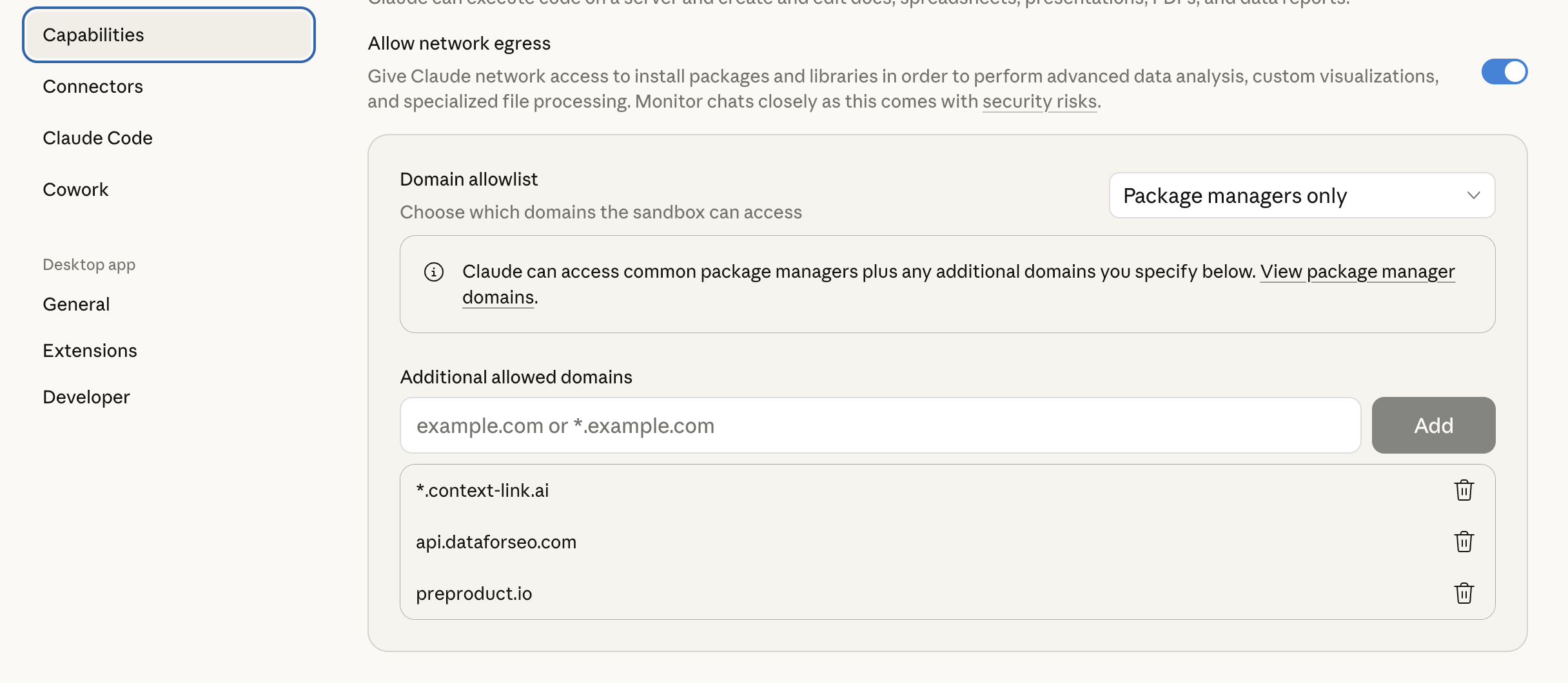
Claude domain allowlist settings

Example usage

First-time setup (wizard flow):

You: Get SEO context

Claude: Tries to fetch seo_memory_guidelines, seo_memory_target_keywords, and seo_memory_competitor_analysis. If any are missing, starts the wizard.

"I found your target keywords and competitor analysis, but no SEO guidelines exist yet. Let me help you create them. What's your target content length for standard blog posts?"

Retrieving existing context:

You: Get SEO writing context, then write a blog post about influencer monetization

Claude: Fetches brand voice, style guide, and writing examples. Uses them to write content that matches your established voice and style.

Updating context after changes:

You: We've decided to shift our tone to be more conversational. Save this to brand voice.

Claude: Compiles the new brand voice guidelines and POSTs them to seo_memory_brand_voice. "Saved to Context Link as seo_memory_brand_voice."

Using with SEO Machine:

If you're using the SEO Machine plugin, run these skills at the start of a session to load your context, then use SEO Machine commands like /write or /research as normal. Claude will have your full brand and SEO context available.

Compared to SEO Machine's local context files

The SEO Machine plugin stores context in local files (context/brand-voice.md, etc.). These Context Link skills store the same information in the cloud. Choose based on your workflow:

Local files (SEO Machine) Context Link skills
Setup Clone repo, edit files Answer wizard questions
Access Only in that repo/project Any AI tool, any device
Updates Edit files directly Use save skills or update via API
Version control Git Context Link versioning
Best for Single project, local workflow Multi-project, cloud-first workflow

You can also use both, start with local files, then migrate to Context Link when you want cross-project access.


Don't have a Context Link account yet? Sign up and connect your first source, start building your SEO content knowledge base today.