# Skill: Update Memory
The **update_memory** skill teaches Claude or Codex how to retrieve an existing Memory from Context Link, merge in new information from the current conversation, and save it back. It's a GET-then-POST workflow that keeps your saved Memories current without starting from scratch.
This is how Memories become *living documents*. Your `/brand-voice` evolves as your tone sharpens. Your `/roadmap` shifts as priorities change. Your `/keyword-tracker` grows as you publish new content. Instead of replacing the whole thing, Claude fetches what's already there, weaves in the new details, and saves the updated version.
## When to use this skill
- A project spec has evolved and you want to merge in the latest decisions without rewriting everything
- You've refined your brand voice or messaging and want to update the saved version
- You want to append new findings to an existing research summary or competitor analysis
- You're iterating on a document over multiple sessions and want each version stored under the same slug
For saving something new (not updating an existing Memory), see the [Save Memory skill](/docs/skill-save-memory). For retrieving context without modifying it, see the [Get Context skill](/docs/skill-get-context).
## How it works
When triggered, the skill:
1. **GETs** the existing content from your Context Link using the slug (e.g. `/brand-voice`)
2. **Merges** the old content with new information from the conversation — deduplicating, reorganising, and keeping it concise
3. **POSTs** the updated content back to the same slug
This creates a new version under the same slug. Old versions are preserved in the background, but retrieval always returns the latest. Two requests total — one GET, one POST.
## The skill file
Below is the full skill definition. Replace `YOUR_CONTEXT_LINK` with your personal Context Link URL (e.g. `yourname.context-link.ai`). If you use a PIN, append `?p=YOUR_PIN` to the URL.
You can download a pre-populated version from the [Installation](/integrations) page in your dashboard — no manual editing needed.
[skill-content skill="update-memory"]
## Installation
### Claude (Chat, Cowork, and Code)
Skills work with **Claude Chat**, **Claude Cowork**, and **Claude Code**. (If you're using Claude Cowork, you can also use the [Context Link Plugin](/docs/claude-plugin) to install all skills at once.)
To install this skill:
1. In **Claude Chat** or **Claude Cowork**, click **Customize** in the top right
2. Click **Skills**, then **+**, then **Upload a skill**
3. Upload the skill file (download from [Installation](/integrations))
4. **Allow network access** (see below)
For **Claude Code**, place the skill file in your project's `.claude/skills/` directory.
#### Allow network access
For Claude to reach Context Link, you need to allow the domain in Claude's settings:
1. In Claude, go to **Settings → Capabilities → Domain Allowlist**
2. Add `*.context-link.ai` to the allowlist (or select "All domains")
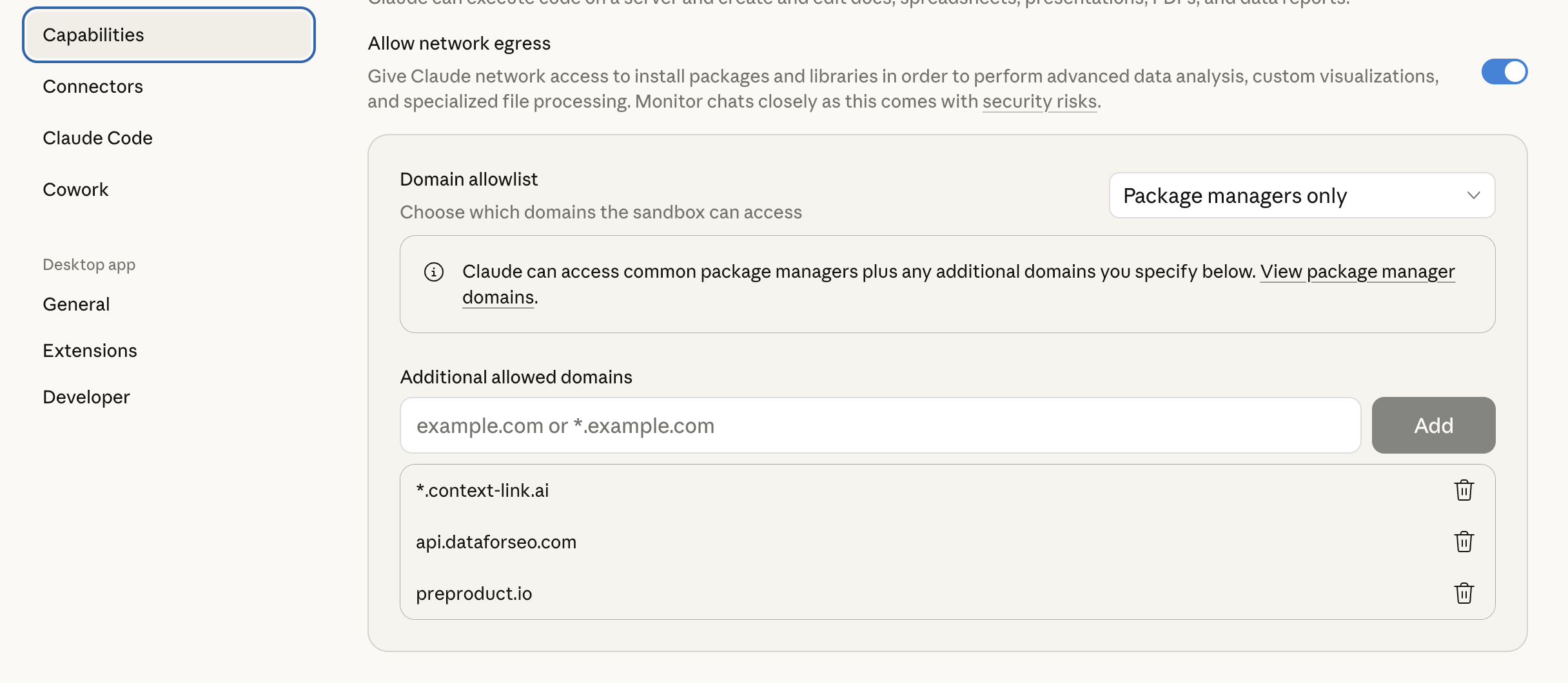 Once installed, tell Claude to **"update [topic] on Context Link"** and it handles the fetch-merge-save cycle.
### OpenAI Codex
1. Download the skill files from [Installation](/integrations)
2. Unzip and place the `update_memory` folder into `~/.agents/skills/` (or your repo's `.agents/skills/` directory)
3. Codex auto-detects the skill
See the [Codex skills documentation](https://developers.openai.com/codex/skills/) for more on skill file locations and priority.
## Example usage
**Updating a brand voice doc after a positioning shift:**
> **You:** We've decided to drop the "revolutionary" language and lean into the pragmatic angle more. Update brand-voice on Context Link.
>
> **AI:** *GETs the existing `/brand-voice` Memory, merges in the new tone direction, removes the "revolutionary" references, POSTs it back.* "Updated `brand-voice` on Context Link."
**Adding new milestones to a roadmap:**
> **You:** Update project-roadmap on Context Link with these new milestones we just discussed.
>
> **AI:** *Fetches the current roadmap, weaves in the new milestones, reorganises by priority, saves.* The next time anyone on the team asks their AI for context on the roadmap, they get the latest version.
**Evolving a keyword tracker after publishing new content:**
> **You:** We just published the AI knowledge base article. Update keyword-tracker with the new published status and URL.
>
> **AI:** *GETs the tracker, marks the keyword as published, adds the URL, POSTs the updated version.*
The skill infers what needs updating from the conversation context, so you don't need to repeat everything — just point it at the right slug and describe what changed.
## How versioning works
- Each update creates a **new version** under the same slug
- Old versions are preserved in the background
- Retrieving by slug (via the [Get Context skill](/docs/skill-get-context), a direct link, the ChatGPT connector, or the API) always returns the latest version
- This means you can update freely without worrying about losing previous content
## The bigger picture: READ and WRITE
Context Link has two core capabilities:
- **READ** (Get Context) — search your connected sources (Notion, Google Docs, websites) and your saved Memories by meaning, and return the most relevant snippets
- **WRITE** (Save + Update) — create and maintain living documents that your AI can build on over time
The update skill is where these two sides meet. You're reading what's already saved, improving it with new information, and writing it back. Over time, your Memories become a curated, evolving knowledge base that any AI tool can draw from — not just Claude, but ChatGPT, Copilot, Gemini, or anything that can reach your Context Link URL.
---
Once installed, tell Claude to **"update [topic] on Context Link"** and it handles the fetch-merge-save cycle.
### OpenAI Codex
1. Download the skill files from [Installation](/integrations)
2. Unzip and place the `update_memory` folder into `~/.agents/skills/` (or your repo's `.agents/skills/` directory)
3. Codex auto-detects the skill
See the [Codex skills documentation](https://developers.openai.com/codex/skills/) for more on skill file locations and priority.
## Example usage
**Updating a brand voice doc after a positioning shift:**
> **You:** We've decided to drop the "revolutionary" language and lean into the pragmatic angle more. Update brand-voice on Context Link.
>
> **AI:** *GETs the existing `/brand-voice` Memory, merges in the new tone direction, removes the "revolutionary" references, POSTs it back.* "Updated `brand-voice` on Context Link."
**Adding new milestones to a roadmap:**
> **You:** Update project-roadmap on Context Link with these new milestones we just discussed.
>
> **AI:** *Fetches the current roadmap, weaves in the new milestones, reorganises by priority, saves.* The next time anyone on the team asks their AI for context on the roadmap, they get the latest version.
**Evolving a keyword tracker after publishing new content:**
> **You:** We just published the AI knowledge base article. Update keyword-tracker with the new published status and URL.
>
> **AI:** *GETs the tracker, marks the keyword as published, adds the URL, POSTs the updated version.*
The skill infers what needs updating from the conversation context, so you don't need to repeat everything — just point it at the right slug and describe what changed.
## How versioning works
- Each update creates a **new version** under the same slug
- Old versions are preserved in the background
- Retrieving by slug (via the [Get Context skill](/docs/skill-get-context), a direct link, the ChatGPT connector, or the API) always returns the latest version
- This means you can update freely without worrying about losing previous content
## The bigger picture: READ and WRITE
Context Link has two core capabilities:
- **READ** (Get Context) — search your connected sources (Notion, Google Docs, websites) and your saved Memories by meaning, and return the most relevant snippets
- **WRITE** (Save + Update) — create and maintain living documents that your AI can build on over time
The update skill is where these two sides meet. You're reading what's already saved, improving it with new information, and writing it back. Over time, your Memories become a curated, evolving knowledge base that any AI tool can draw from — not just Claude, but ChatGPT, Copilot, Gemini, or anything that can reach your Context Link URL.
---
Don't have a Context Link account yet? [Sign up and connect your first source](https://context-link.ai) — start building living documents your AI can maintain and improve over time.