# Skill: Ask Question
The **ask_question** skill is a set of instructions you add to a Claude project or Codex workspace so your AI can get a direct, cited answer from your Context Link instead of reading through retrieved chunks. Under the hood it runs the same semantic retrieval as [get_context](/docs/skill-get-context), then passes the matching snippets to a small fast LLM that composes one concise paragraph with numbered citations back to the exact source snippets used.
The result: when you just want the answer, you get the answer. When you need the source material for the AI to reason over, you still use get_context.
## When to use this skill
- You want a direct answer, not a pile of chunks to read
- You need an answer that cites its sources so you can verify or share it
- You're building an agent that treats your Context Link as a Q&A system rather than a retrieval system
- You want the output pasted straight into a reply, an email, a doc, or a Slack message
This skill covers the direct-answer workflow. For retrieval (the AI reasons over raw snippets), see the [Get Context skill](/docs/skill-get-context). For saving and updating content, see the [Save Memory skill](/docs/skill-save-memory) and [Update Memory skill](/docs/skill-update-memory).
## How it works
1. You (or Claude) invoke the skill with a question, for example `/ask-question what is our refund policy?` or "ask Context Link what our office hours are"
2. Context Link runs a semantic search across all your connected sources for that question
3. The top matching snippets are passed to a small fast LLM that composes one concise paragraph (at most ~120 words) grounded only in those snippets
4. The answer comes back as JSON: `{ "result": "ok", "answer": "…with inline [1] markers…", "citations": [{ "n": 1, "title": "…", "url": "…" }], "format": "markdown" }`
5. Claude presents the answer verbatim, keeping the `[1]` / `[2]` citation markers and listing the sources underneath
Every citation marker resolves to a real snippet in the `citations` array. The LLM is instructed to use only the numbered context blocks, so claims that can't be grounded in your own content don't get generated. When no relevant context is found, the response is `result: "no_context"` with `answer: null` rather than a fabricated answer. When the upstream LLM is temporarily unavailable, the response is `result: "llm_unavailable"` with HTTP 503, so callers can retry.
## Get Context vs. Ask Question
| | Get Context | Ask Question |
|---|---|---|
| What it returns | Raw relevant snippets | One paragraph with citations |
| Good for | Generative tasks where the AI reasons over source material | Direct answers you can paste |
| Pricing | Included on every plan | Pro plan only, counts toward the 1,000 requests/month LLM allowance |
| When it falls back | Returns fewer snippets if retrieval is thin | Returns `no_context` and `answer: null` if retrieval is empty |
Both skills hit the same retrieval pipeline, so improvements in retrieval quality benefit both.
## Modes
Like Get Context, Ask Question accepts a `?mode=…` parameter to weight results toward a named profile (e.g. `customer-support`, `sales`). Configure modes on the [Connections](/connections) page.
## Pricing and limits
Ask Question is a **Pro** feature. It counts toward the monthly LLM allowance (**1,000 requests/month**, shared across all LLM-powered features). If your plan can't use the skill, the endpoint returns `402 Payment Required` with an upgrade prompt. If the monthly allowance is exhausted, the endpoint returns `429 Too Many Requests` with a reset-at-start-of-month message. Rate limit is **2 requests per 10 seconds** per user (tighter than Get Context because each call is a real LLM request).
## The skill file
Below is the full skill definition. Replace `YOUR_CONTEXT_LINK` with your personal Context Link URL (e.g. `yourname.context-link.ai`). If you use a PIN, append `?p=YOUR_PIN` to the URL.
You can download a pre-populated version from the [Installation](/integrations) page in your dashboard, no manual editing needed.
[skill-content skill="ask-question"]
## Installation
### Claude (Chat, Cowork, and Code)
Skills work with **Claude Chat**, **Claude Cowork**, and **Claude Code**. (If you're using Claude Cowork, you can also use the [Context Link Plugin](/docs/claude-plugin) to install all skills at once.)
To install this skill:
1. In **Claude Chat** or **Claude Cowork**, click **Customize** in the top right
2. Click **Skills**, then **+**, then **Upload a skill**
3. Upload the skill file (download from [Installation](/integrations))
4. **Allow network access** (see below)
For **Claude Code**, place the skill file in your project's `.claude/skills/` directory.
#### Allow network access
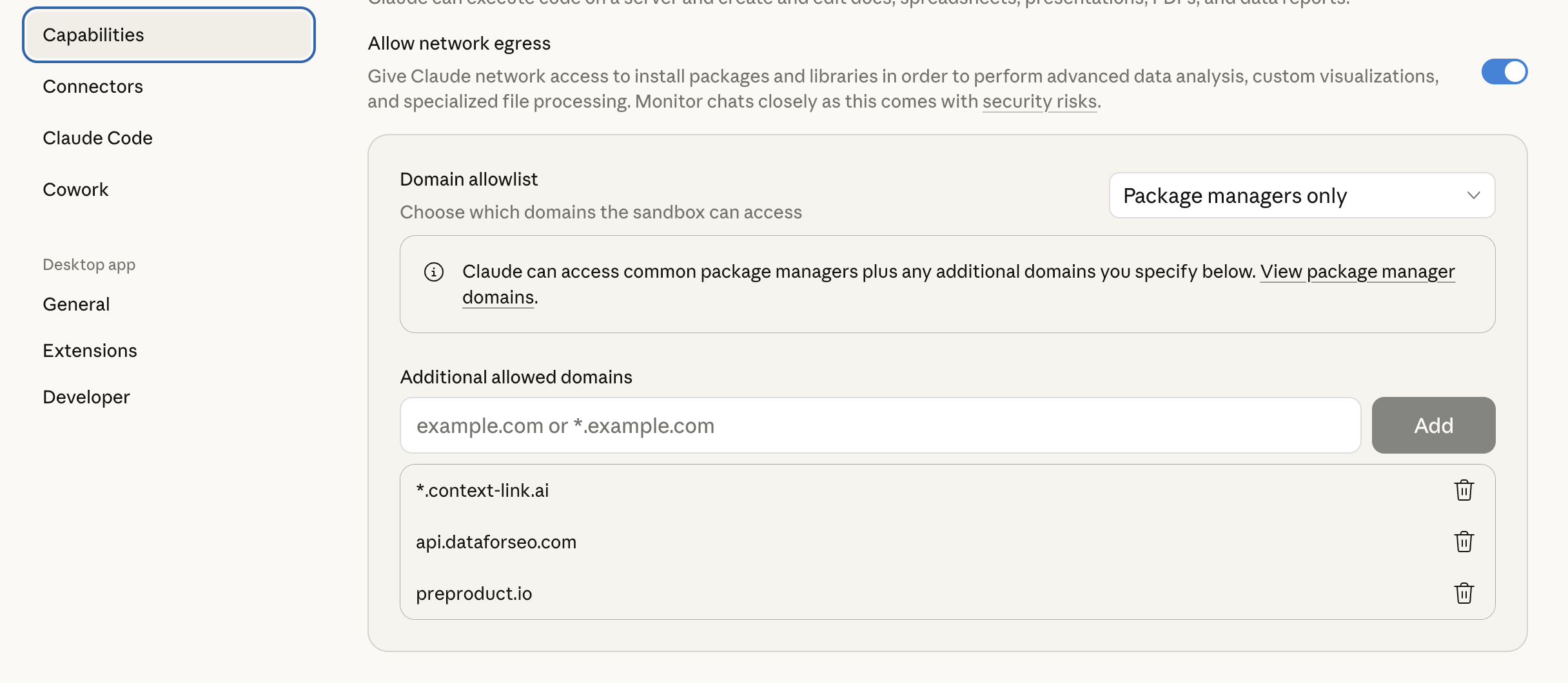
For Claude to reach Context Link, you need to allow the domain in Claude's settings:
1. In Claude, go to **Settings → Capabilities → Domain Allowlist**
2. Add `*.context-link.ai` to the allowlist (or select "All domains")
Once installed, say **"/ask-question [your question]"** or **"ask Context Link what [topic]"** in any Claude conversation, and Claude will fetch a grounded answer from your connected sources.
### OpenAI Codex
1. Download the skill files from [Installation](/integrations)
2. Unzip and place the `ask_question` folder into `~/.agents/skills/` (or your repo's `.agents/skills/` directory)
3. Codex auto-detects the skill. Invoke it explicitly with **"/ask-question …"** or it will pick it up implicitly when you ask a direct question that should be grounded in your own content
See the [Codex skills documentation](https://developers.openai.com/codex/skills/) for more on skill file locations and priority.
## How it fits with other access methods
Ask Question is one of several ways to get a grounded answer from your Context Link:
- **Claude Skills / Codex Skills** (this doc) — pre-written instructions that teach Claude or Codex to invoke the ask endpoint when you ask a direct question
- **Subdomain URL** — paste `https://YOUR-SUBDOMAIN.context-link.ai/q/what-is-pricing?p=YOUR_PIN` into any AI chat. The agent fetches and you get the answer inline. Convenient for one-off queries.
- **REST API** — call `GET /api/v1/question?query=…` with your API key from scripts, automations, or custom integrations. Full reference at [Question Endpoint](/docs/question-endpoint).
Skills make the experience seamless inside Claude and Codex. The same capability is available to any AI tool through the subdomain URL or the REST API.
## Example usage
**Getting a cited answer mid-conversation:**
> **You:** Ask Context Link what our refund policy is for annual plans.
>
> **AI:** *Invokes ask_question, returns a one-paragraph answer with `[1]` and `[2]` inline citations, and lists the two source docs underneath.*
**Drafting a reply and needing one fact:**
> **You:** I'm replying to a customer. /ask-question what did we decide about the early access program deadline?
>
> **AI:** *Returns a grounded paragraph citing the Notion page where that decision was recorded, so you can paste it straight into the reply.*
**Deciding when to upgrade from get_context:**
> **You:** Get context on our pricing. Actually, just ask Context Link what our enterprise pricing floor is.
>
> **AI:** *Switches to ask_question and returns a direct answer with a citation, instead of pulling raw chunks you'd have to read through.*
The skill triggers on phrases like "ask Context Link", "ask my docs", "answer this from my context", or any direct question that should be grounded in the user's own content.
## See also
- [Question Endpoint API reference](/docs/question-endpoint) — full request/response schema, status codes, and cross-language examples
- [Get Context skill](/docs/skill-get-context) — for when you want raw snippets rather than a composed answer
- [Ways to Talk to Context Link](/docs/ways-to-talk-to-context-link) — overview of every access method
---
Don't have a Context Link account yet? [Sign up and connect your first source](https://context-link.ai), then upgrade to Pro to enable Ask Question.
 Once installed, say **"/ask-question [your question]"** or **"ask Context Link what [topic]"** in any Claude conversation, and Claude will fetch a grounded answer from your connected sources.
### OpenAI Codex
1. Download the skill files from [Installation](/integrations)
2. Unzip and place the `ask_question` folder into `~/.agents/skills/` (or your repo's `.agents/skills/` directory)
3. Codex auto-detects the skill. Invoke it explicitly with **"/ask-question …"** or it will pick it up implicitly when you ask a direct question that should be grounded in your own content
See the [Codex skills documentation](https://developers.openai.com/codex/skills/) for more on skill file locations and priority.
## How it fits with other access methods
Ask Question is one of several ways to get a grounded answer from your Context Link:
- **Claude Skills / Codex Skills** (this doc) — pre-written instructions that teach Claude or Codex to invoke the ask endpoint when you ask a direct question
- **Subdomain URL** — paste `https://YOUR-SUBDOMAIN.context-link.ai/q/what-is-pricing?p=YOUR_PIN` into any AI chat. The agent fetches and you get the answer inline. Convenient for one-off queries.
- **REST API** — call `GET /api/v1/question?query=…` with your API key from scripts, automations, or custom integrations. Full reference at [Question Endpoint](/docs/question-endpoint).
Skills make the experience seamless inside Claude and Codex. The same capability is available to any AI tool through the subdomain URL or the REST API.
## Example usage
**Getting a cited answer mid-conversation:**
> **You:** Ask Context Link what our refund policy is for annual plans.
>
> **AI:** *Invokes ask_question, returns a one-paragraph answer with `[1]` and `[2]` inline citations, and lists the two source docs underneath.*
**Drafting a reply and needing one fact:**
> **You:** I'm replying to a customer. /ask-question what did we decide about the early access program deadline?
>
> **AI:** *Returns a grounded paragraph citing the Notion page where that decision was recorded, so you can paste it straight into the reply.*
**Deciding when to upgrade from get_context:**
> **You:** Get context on our pricing. Actually, just ask Context Link what our enterprise pricing floor is.
>
> **AI:** *Switches to ask_question and returns a direct answer with a citation, instead of pulling raw chunks you'd have to read through.*
The skill triggers on phrases like "ask Context Link", "ask my docs", "answer this from my context", or any direct question that should be grounded in the user's own content.
## See also
- [Question Endpoint API reference](/docs/question-endpoint) — full request/response schema, status codes, and cross-language examples
- [Get Context skill](/docs/skill-get-context) — for when you want raw snippets rather than a composed answer
- [Ways to Talk to Context Link](/docs/ways-to-talk-to-context-link) — overview of every access method
---
Once installed, say **"/ask-question [your question]"** or **"ask Context Link what [topic]"** in any Claude conversation, and Claude will fetch a grounded answer from your connected sources.
### OpenAI Codex
1. Download the skill files from [Installation](/integrations)
2. Unzip and place the `ask_question` folder into `~/.agents/skills/` (or your repo's `.agents/skills/` directory)
3. Codex auto-detects the skill. Invoke it explicitly with **"/ask-question …"** or it will pick it up implicitly when you ask a direct question that should be grounded in your own content
See the [Codex skills documentation](https://developers.openai.com/codex/skills/) for more on skill file locations and priority.
## How it fits with other access methods
Ask Question is one of several ways to get a grounded answer from your Context Link:
- **Claude Skills / Codex Skills** (this doc) — pre-written instructions that teach Claude or Codex to invoke the ask endpoint when you ask a direct question
- **Subdomain URL** — paste `https://YOUR-SUBDOMAIN.context-link.ai/q/what-is-pricing?p=YOUR_PIN` into any AI chat. The agent fetches and you get the answer inline. Convenient for one-off queries.
- **REST API** — call `GET /api/v1/question?query=…` with your API key from scripts, automations, or custom integrations. Full reference at [Question Endpoint](/docs/question-endpoint).
Skills make the experience seamless inside Claude and Codex. The same capability is available to any AI tool through the subdomain URL or the REST API.
## Example usage
**Getting a cited answer mid-conversation:**
> **You:** Ask Context Link what our refund policy is for annual plans.
>
> **AI:** *Invokes ask_question, returns a one-paragraph answer with `[1]` and `[2]` inline citations, and lists the two source docs underneath.*
**Drafting a reply and needing one fact:**
> **You:** I'm replying to a customer. /ask-question what did we decide about the early access program deadline?
>
> **AI:** *Returns a grounded paragraph citing the Notion page where that decision was recorded, so you can paste it straight into the reply.*
**Deciding when to upgrade from get_context:**
> **You:** Get context on our pricing. Actually, just ask Context Link what our enterprise pricing floor is.
>
> **AI:** *Switches to ask_question and returns a direct answer with a citation, instead of pulling raw chunks you'd have to read through.*
The skill triggers on phrases like "ask Context Link", "ask my docs", "answer this from my context", or any direct question that should be grounded in the user's own content.
## See also
- [Question Endpoint API reference](/docs/question-endpoint) — full request/response schema, status codes, and cross-language examples
- [Get Context skill](/docs/skill-get-context) — for when you want raw snippets rather than a composed answer
- [Ways to Talk to Context Link](/docs/ways-to-talk-to-context-link) — overview of every access method
---